
Improve the User Experience of State Farm’s Homeowners Insurance Website
Introduction
Founded in 1922 by retired farmer and insurance salesman George Jacob Mecherle, State farm has become a trustworthy and reliable company with a high brand recognition with its trademark slogan, “Like a good neighbor, State Farm is there”. State Farm offers nearly 100 products and services.
But the company today lacks a strong connection with emerging adults and is struggling to gain customers in the 18-30 year old demographic. There is a rising number of direct to customer insurance options and higher demand for websites that have an intuitive and efficient interface.
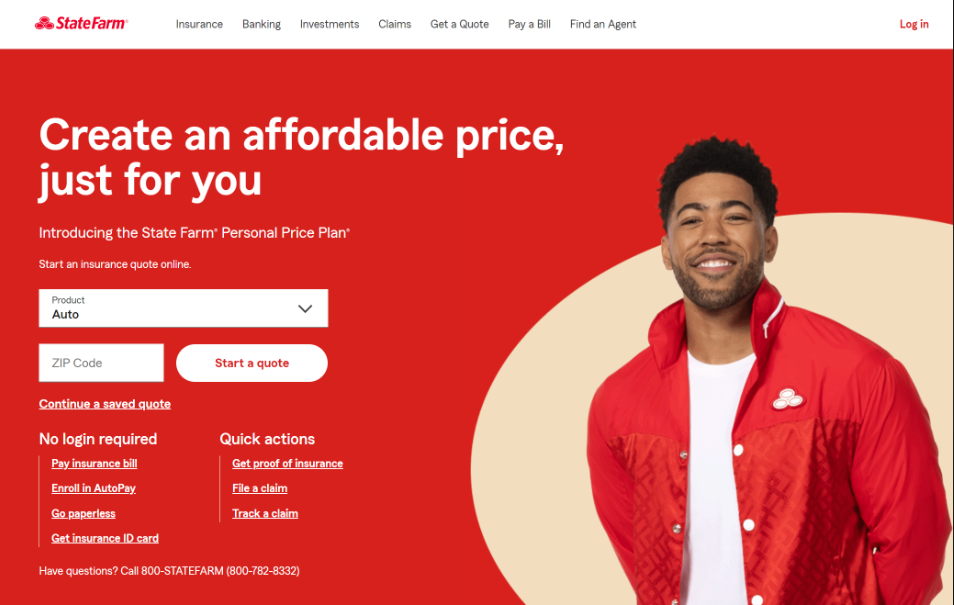
For a major insurance company, State Farm’s direct to customer website is old fashioned. The process of getting a quote for homeowners is not very user friendly or efficient.
Goal
The purpose of this case study is to change the perception customers have regarding the State Farm website, particularly the process of getting a homeowner’s insurance quote. I aim to improve the user experience of the site by analyzing and understanding the problems users face and come up with viable solutions that could possibly help the company establish a better presence in the direct-to-consumer insurance market.
Identifying Problems
I did a heuristic analysis to evaluate the usability of the website Statefarm.com, in particular the process of getting a homeowners insurance quote. I also did an analysis of competing websites (Geico, Lemonade etc.) to understand opportunities for offering a better user experience. The key areas of concern identified were the outdated look and feel of the website and the lack of consistency. The cluttered nature of some of the pages is also a challenge for users.
I further did a quick survey (using Survey Monkey) to get a wider perspective of what could be improved on the State Farm website - the key results of that survey corroborated with my assessment of what can be improved.
Here are the 3 areas where the existing website lacks user focus and needs to be improved in order to transform the website into an engaging platform.


Problem 1: Outdated nature of the website
The flow lacks intuitiveness making the process feel longer than it needs to be,
The overall tone of conversation across the site is very direct and not friendly.
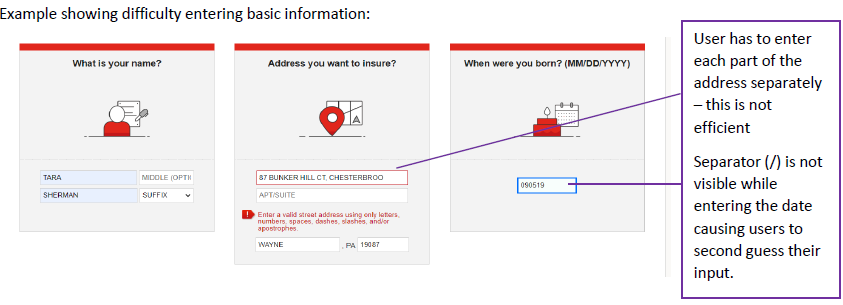
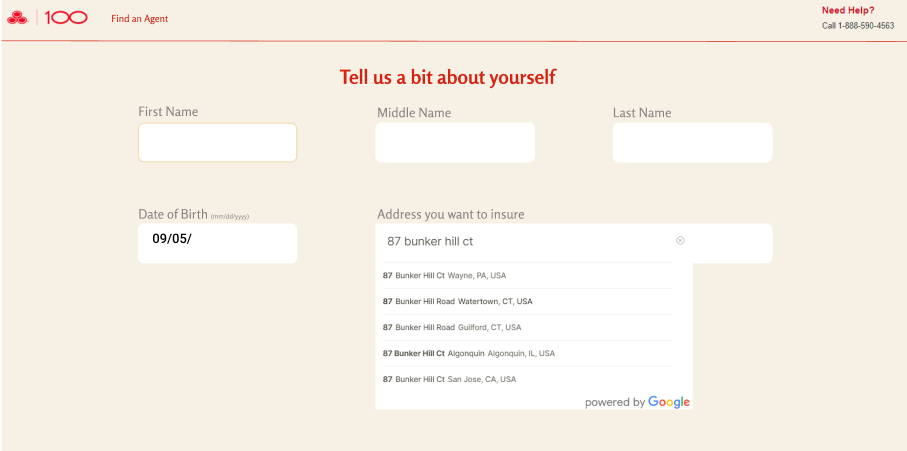
Difficulty entering basic information like the address and birthday. Newer web designs make populating address and dates much easier.
The screen captures show these problems in the context of Statefarm.com. The annotations provide additional details of the problem.
Justification:
Traditionally websites were built to address a company’s needs rather than the user’s needs. With almost all the companies having an online presence, this approach needs to change. Newer well designed websites are more engaging because of an intuitive and attractive interface.
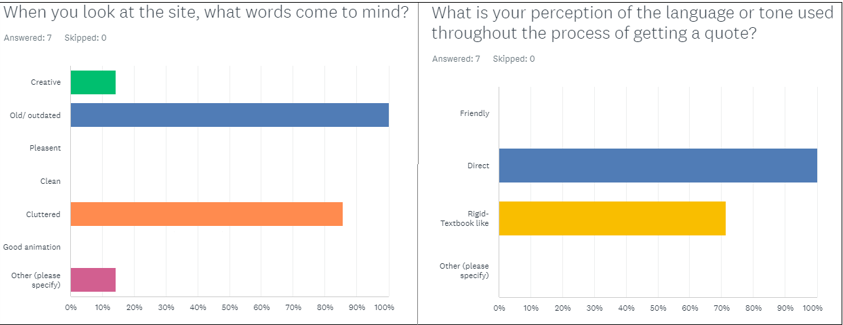
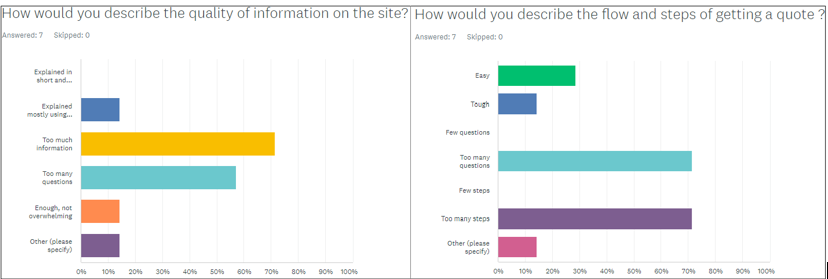
In my survey, 100% of the respondents found the State Farm website to be outdated and a majority of them felt the tone across the site was not friendly.
Solution:
My solution to the above problems is to design a friendlier and more attractive interface while keeping the design simple and clean.
If users instantly like a site, there is a higher chance for them stick around and explore. Today website are achieving this by taking everything into consideration, from color scheme to the effective use of images over text, down to the tone used across the site.
The different products and services offered on the website are shown using images and buttons as navigation elements rather than the drop down text option while retaining the company’s brand identity (colors and phrases).
The address field is a single entry rather than multiple fields with a type ahead search and address automatic parsing (if user pastes an address instead of entering it). The date separator will appear as the date is being entered.
Problem 2: Too much information
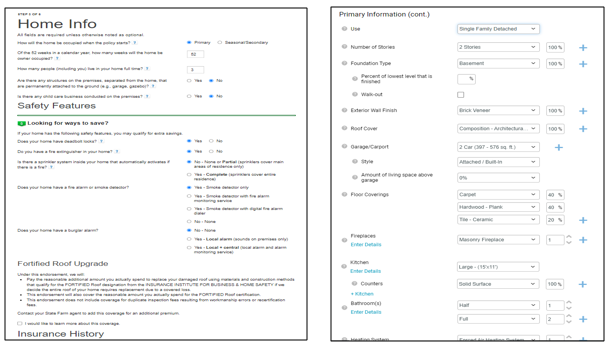
Each page has way too much information making the pages look boring (textbook like).It is overwhelming for user because they have to read through it all and users have to keep scrolling down to get to the continue button.
The site consolidates multiple steps into a single page in an attempt to reduce steps. But each page has too many questions to go through making it cumbersome for the users. Even though the fields are prepopulated (RC360), users have too many fields to check and edit on a single page
Justification:
Research has shown that having too much information on a site leads to overwhelmed visitors and a higher chance of them exiting the site. Too many questions or input fields give users the perception that the task at hand is much more difficult than it actually is.
According to the results of my survey, 70% of the respondents found that most of the pages had too many questions on a single page and a lot of information for them to go through before moving on to the next step.
Solution:
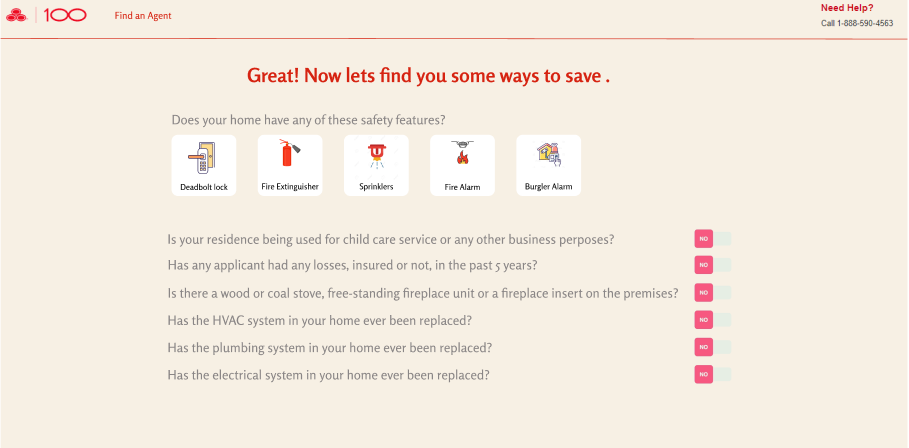
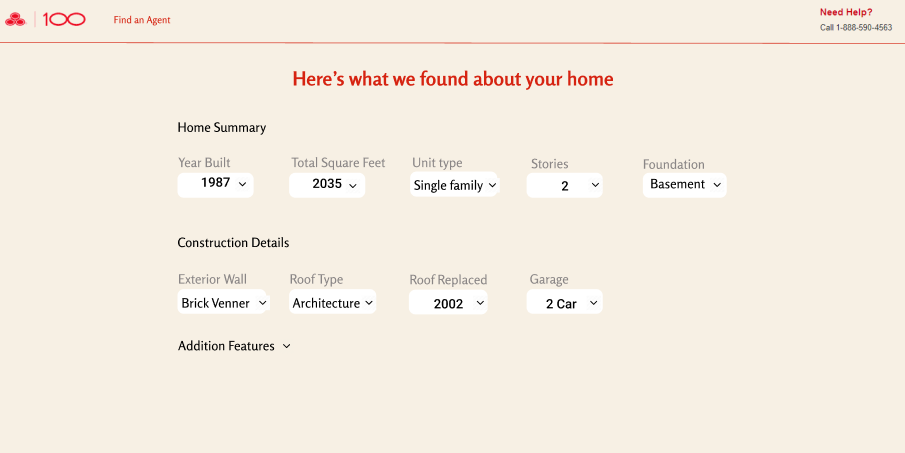
The solution I envision as shown in the wireframes, is a simpler, cleaner and an appealing design with less information and a lower number of input fields on each page.
The five questions asked under “Safety Features” in the original design is made into a single question that the user can answer by selecting all the icons that apply.
All the questions related to “Extra Savings “are categorized together. Users can answer them using the yes/no toggle.
The main prepopulated details of the house (RC360) are shown under 2 categories to make it easy for users to understand. Additional details section will only expand when clicked.
A good website requires a balance of images to text. Too much content can cause the users to become unfocused and might lead them to abandon the site. Less information helps users focus on the task at hand and keep up with it till the end. Because of a raising number of simplistic interface designs, most people especially early adults, have a reduced attention span when it comes to staying with a website. A clean design will make the most of that time and most likely extend the time users spend on the site.
Problem 3: Lack of consistency
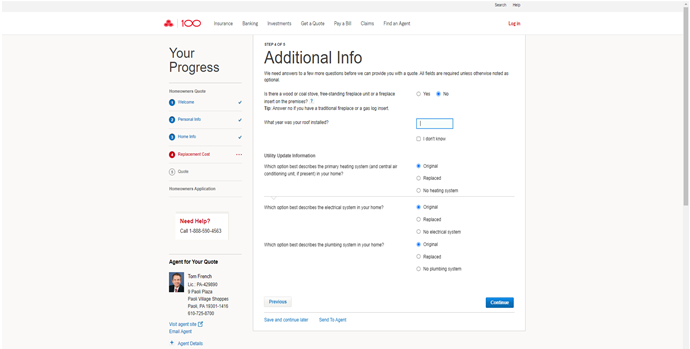
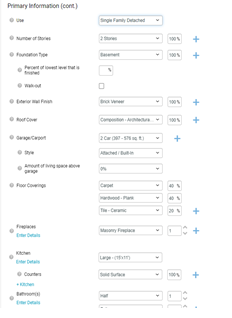
The sequential pages in the process don’t keep up with a consistent alignment and format. On some pages as shown below, the information is centered and on others they are left aligned with a completely different fonts and layout.
The color and page alignment are not consistent on consecutive pages making them look like they were taken from two different sites.
The company logo and help options like “find an agent” or the help line number do not appear on the primary information page. Users have to exit the page to find these options in case they get stuck.
Justification:
Consistency between pages of a website greatly impacts the overall look and appeal of the website. According to Jakob Nielsen’s fourth heuristic- Consistency and Standards, websites should adhere to internal consistency, that is, use the same patterns everywhere inside the system to make the site easy to learn and use. Symbols, iconography, and imagery used should be consistent across the site. If a site is inconsistent, it distracts the users, slowing them down and causing them to lose interest and bounce off the site.
Solution:
The solution to the above problems is to design every page with a consistent look with a similar color scheme, symbols, typography, and alignment across all pages. The design should also include the company logo and user support options (help line number) on every page.
A consistent design means that all the UI elements (company logo, navigation elements and page content) appear in the same place throughout the website, making navigation easier for the users. A consistent design can give a website a sense of identity, ease of navigation, and aid in the proper communication of information. Proper alignment of elements such as images and text gives a site a professional look and makes it visually appealing and calming. Consistent alignment of text across pages can also add a sense of order and improve the readability of the site.
Conclusion
State Farm is one of the leading insurance companies with a variety of products, but the website is old fashioned and lacks consistency. This case study identifies three areas where significant improvement can be made, especially in the homeowners insurance quote process. The case study contains initial wireframes for an intuitive and attractive design. As a next step these wireframes will be expanded upon to form an interactive prototype as the outcome of the user experience design effort.